
What CRM is for
A CRM is not an address book. You already have one of those.
A CRM answers a different question: which deals are we likely to win, and what needs to happen next on each one?
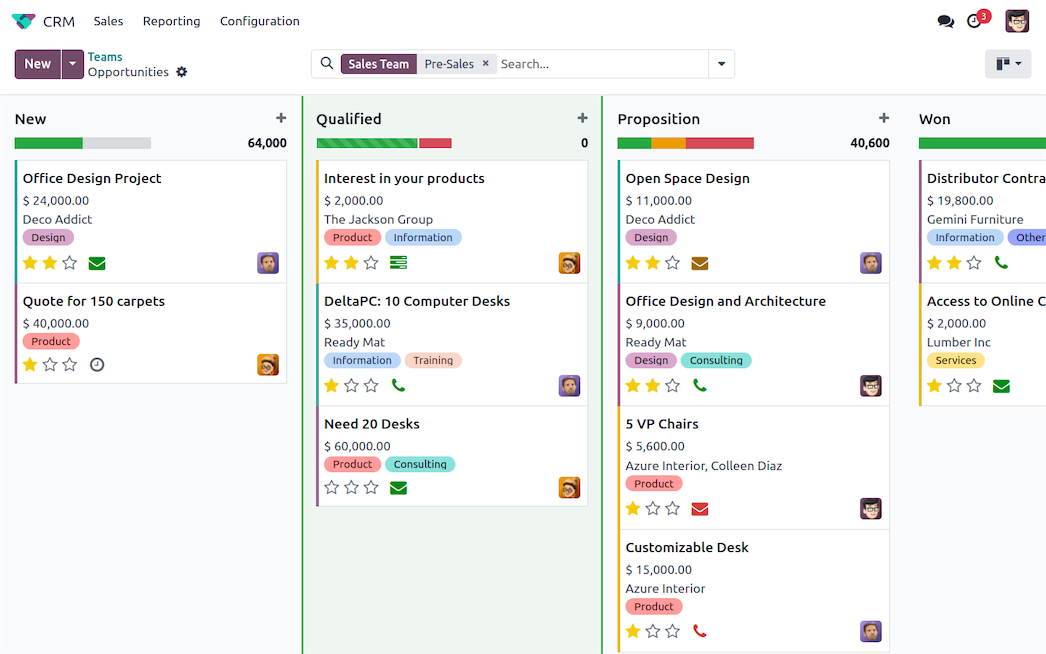
Odoo CRM does this with a pipeline. Every opportunity sits in a stage, moves forward as things happen, and eventually is won or lost. That simple structure is what turns a pile of enquiries into something you can manage.
Leads and opportunities
Odoo separates these two, and understanding the difference saves confusion later.
A lead is raw and unqualified. Somebody filled in your website form. A business card came back from a trade show. You do not yet know if there is a real deal here.
An opportunity is a lead you have qualified. There is a real customer, a real need, and a realistic chance of a sale.
Leads are optional. In Settings you can turn them off, and every enquiry becomes an opportunity directly.
Use leads if: you get a lot of low-quality enquiries and someone needs to filter them first.
Skip leads if: most of what comes in is worth pursuing. The extra step will just annoy your sales team.
Setting up your pipeline
The pipeline is the heart of the system, and this is the setup decision worth thinking about properly.
Stages should describe what has happened, not what you hope will happen.
A common working set:
- New — an opportunity exists, nothing has happened yet
- Qualified — you have spoken to them and confirmed there is a real need
- Proposal Sent — a quotation is with the customer
- Negotiation — they are engaged and discussing terms
- Won / Lost — closed
Three rules for good stages:
Keep it under seven. More than that and people stop updating them properly.
Make each one a fact, not a feeling. “Proposal Sent” is checkable. “Interested” is an opinion, and everybody will interpret it differently.
Match how you actually sell. If your process has a site visit, that is a stage. Do not copy someone else’s pipeline.
FIGURE 1: A WORKING PIPELINE
New
- Nothing done yet
Qualified
- Real need confirmed
Proposal Sent
- Quotation with customer
Negotiation
- Discussing terms
Won or Lost
- Closed
Working the pipeline day to day
Creating opportunities
They arrive four ways: typed in manually, from your website contact form, from incoming email to a sales alias, or imported.
The website route is worth setting up early. A form submission becomes an opportunity automatically, with the customer’s details already filled in.
Every opportunity needs a next activity
This is the single most important habit in the whole system.
Odoo has activities — a call, a meeting, an email, a to-do, each with a date and an owner. When you finish one, you schedule the next.
An opportunity with no scheduled activity is an opportunity nobody is working on. Odoo will show these to you clearly, and that list is usually where forgotten deals are hiding.
Make it a rule: no opportunity leaves your screen without a next activity on it.
FIGURE 2: WHAT MAKES A PIPELINE USEFUL
A working pipeline
- Under seven stages
- Each stage is a checkable fact
- Every opportunity has a next activity
- Lost reasons recorded
A pipeline nobody trusts
- Twelve stages nobody updates
- Stages like “Interested”
- Deals sitting untouched for months
- Losses closed with no reason
Logging what happened
Every opportunity has a chatter — the message thread at the bottom. Log calls there, send emails from there, and the whole history stays on the record.
The reason this matters is not tidiness. It is that when the salesperson is on leave and the customer calls, somebody else can pick it up in thirty seconds.
Expected revenue and close date
Fill both in. They are what makes forecasting possible.
Expected revenue is the deal value. Expected closing is your honest estimate of when it lands. Odoo weights the forecast by each stage’s probability.
The forecast is only as honest as these two fields. A pipeline where everything closes “next month” forever is worse than no forecast at all.
Turning an opportunity into a sale
When you win, click New Quotation from the opportunity.
The customer, contact and address carry across. The quotation is linked back to the opportunity, so you can always trace which sales effort produced which order.
Confirm the quotation and it becomes a sales order — which creates the delivery and prepares the invoice, all from the same record.
That link is the reason to run CRM inside Odoo rather than in a separate tool. There is no export, no re-entry, and no gap between “we won it” and “we are delivering it”.
Losing well
Losing deals is normal. Losing them without recording why is a waste.
When you mark an opportunity lost, Odoo asks for a lost reason. Set up a short list that reflects reality — price, timing, competitor, no budget, no response.
Then look at that report every quarter. It is one of the few genuinely useful reports in a CRM. If half your losses are “price”, that is a pricing conversation. If half are “no response”, that is a follow-up problem.
Reports worth looking at
Pipeline by stage. Where the value is sitting right now. Watch for stages that are clogged.
Expected revenue by month. Your forecast. Compare it to what actually closed and you will learn how optimistic your team is.
Won versus lost. Your conversion rate, by salesperson and by source.
Activities overdue. Not really a sales report — it is a discipline report. A long list here means the pipeline data cannot be trusted.
Common mistakes
Too many stages. People stop moving deals properly and the pipeline stops reflecting reality.
Stale opportunities. Deals from eight months ago sitting in “Negotiation”. Either work them or lose them. A pipeline full of dead deals makes the forecast meaningless.
No next activity. Covered above, and worth repeating. This is the difference between a pipeline and a list.
Using it as a reporting tool only. If the sales team updates the CRM once a month so management can run a report, you have a spreadsheet with extra steps. It has to be useful to the person selling, or it will not be maintained.
Getting started
Do not configure everything at once. Start here:
- Set up five or six stages that match how you really sell
- Turn leads off unless you genuinely need a filter step
- Connect your website contact form
- Set up a short list of lost reasons
- Make “always schedule the next activity” the one non-negotiable rule
Run it that way for a month. Then add automation, scoring and email campaigns once the basics are a habit.
Want a pipeline your sales team will actually use?
Get in touch. We set up stages around how you really sell, and connect the pipeline to your quotations so nothing is retyped.
Related reading: Odoo Inventory Management: A Practical Guide · Why Businesses Choose Odoo · Odoo module – Purchase Payment Status